Setting up an Antidetect Browser for many accounts is one of the most practical skills anyone who manages online enterprises, ad campaigns, or social media at scale can have. Sites like Facebook, TikTok, and Amazon are more proactive about spotting and removing accounts that share the same digital fingerprint. A regular VPN changes your IP address. It does not alter your browser fingerprint, which is exactly what triggers accounts to be detected.
This article takes you through the whole setup. From the first day, you will know what a digital fingerprint is, how Antidetect Browsers work, and how to set things up right.
Configure an Antidetect Browser for Multiple Accounts
Most folks think a VPN is all you need. Unfortunately, that’s not the case.
Each time you access a website, your browser transmits dozens of data points, including your IP address. These include your screen resolution, operating system, installed fonts, audio configuration, WebGL hash, and canvas fingerprint. Combined, these signals establish a unique identity – your digital fingerprint.
So even if they have distinct IPs, two accounts operating on the same browser on the same device look the same to platforms. They have the same fingerprint. This enables the platforms to connect the dots and flag both accounts.
This is solved by an Antidetect Browser, which creates segregated browser profiles. Each profile has a unique, realistic fingerprint. Also, each one runs in its own environment – fully isolated from the others. Each profile is treated like a single individual on a single device by platforms.
That’s the beginning. Now we will go into the real setup.
How to Set up an Antidetect Browser for Multiple Accounts: Step-by-Step Guide
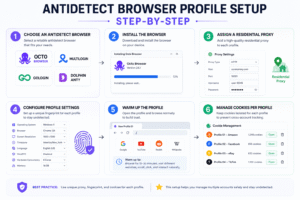
Step 1 – Select a Suitable Antidetect Browser
The first decision is more important than people realise. Not all Antidetect Browsers are created equal. Some merely cover basic fingerprint surfaces. Others go even further: faking Audio API, Battery status, ClientRects, Speech, and WebGL render hashes.
Serious multi-account work is typically done with one of the following in 2026:
- Octo Browser — deep fingerprint, solid team features, €29–€149/month
- Multilogin — top-notch fingerprint quality, Chromium and Firefox profile compatibility, higher price
- GoLogin — cheap entry point, cloud profiles, less coverage on fingerprints
- Dolphin Anty – favoured by ad buyers, has a free tier with 10 profiles
- AdsPower — concentrate on no-code automation, easy for beginners
Your decision varies depending on scale and budget. But for the majority of professional use cases, Octo Browser or Multilogin offer the best protection from contemporary detection technologies.
Step 2 – Install the application
Download your favourite browser only from the official website. Third-party downloads are also a genuine security risk. Most Antidetect Browsers are desktop apps for Windows or macOS.
Installation is simple. Standard installer. Accept terms. Choose a strong password and enable two-factor authentication instantly. And that last step is important. Your profiles contain critical account data. “So the first thing is to get access.
Step 3: Get some good quality proxies
This is the step where many beginners make costly blunders. The proxy is the way that each profile gets its own IP. But the type of proxy is hugely important.
- Residential proxies are real house IP addresses. They are the most trusted by platforms and the most difficult to detect. These are for high-stakes accounts on Facebook, TikTok, or Amazon.
- Mobile proxies rotate through real mobile carrier IP addresses. They have the highest level of trust. However, they are also the most expensive alternative.
- Datacenter proxies are fast and affordable. But datacenter IP ranges are easily detected by networks like Facebook and Instagram. Don’t use these for social profiles.
Important rule: one profile must be assigned one unique proxy. Do not use the same proxy for many accounts. Platforms cross-check IPs all the time.
Step 4 — Build Your First Browser Profile
Launch your Antidetect Browser and go to the profile creation section. You will need to set several fields carefully.
- Operating System: Select Windows or macOS. Try to match it to what genuine consumers in your target location generally use. It is not natural to arbitrarily mix operating systems.
- Browser version. Set this to a recent/common Chrome version. Ancient browser versions trigger alarms. Very few real users are on ancient releases.
- Screen resolution. Choose a standard resolution — 1920×1080 or 1366×768. Statistically, profiles with peculiar resolutions are rare and easier to identify.
- Language and time zone. They have to be where your proxy is. But if a profile has a Polish timezone and uses a US residential proxy, it’s going to appear suspect. The most important element here is consistency.
- WebRTC. Disable this setting or spoof it. WebRTC can reveal your true IP even with a proxy on. Most Antidetect Browsers do this automatically — but be sure it’s set up.
Click Save when finished. Then set your proxy to it before you start.
Step 5 — Heat Up Each Profile Properly
A newly formed profile has no history. That alone is suspicious enough for machine learning fraud detection solutions.
Warming up is the process of generating natural browsing behaviour before creating accounts or logging into them. Open the profile and browse as normal for a few days. Visit news sites. Check social media feeds. Do a Google search. Allow the profile to gather cookies and browsing data that appears legitimate.
Also, do not establish accounts on numerous profiles simultaneously or in quick succession. Divide the activity. Real people don’t make 5 accounts in an hour.
Step 6 – Use Different Cookies and Sessions
If you are restoring accounts and not establishing new ones, then import their cookie files to the appropriate profiles. Most Antidetect Browsers have a mechanism to import cookies for this.
Each profile should contain only the cookies for its account. Even a single shared cookie can link profiles in ways that lead to restrictions through cross-contamination.
Also, never log into the same account from two separate profiles. Session overlap produces a discrepancy in platform logs, and fraud systems identify this rapidly.
Setting Up an Antidetect Browser for Multiple Accounts: Proxy Configuration Tips
Half the battle is getting the proxy setup right. The important facts most guides leave out are here.
Match geography accurately. Use US residential proxies if you are managing US Amazon seller accounts. Do not employ proxies from neighbouring nations as replacements. Platforms align shipment addresses, payment methods,s and IP geolocation. The inconsistencies pile up.
- Use sticky sessions. A rotating proxy that switches IPs every few minutes is good for scraping. But for account management, you need sticky sessions – a set IP for the duration of each session. Otherwise, your account always seems to log in from somewhere else.
- Test Each Proxy Before Assigning It. Run each proxy via a tester like IPQualityScore before connecting to an account. This will show whether the IP was ever warned or listed in spam databases before.
- Avoid free proxies altogether. Free proxy lists are repeated and misused, and every single major platform blacklists them. They do not reduce the risk of discovery but actively enhance it.
Pros and Cons of Using an Antidetect Browser for Multiple Accounts
Pros
- Real account isolation. Every profile runs in a sandbox of its own. If one account is flagged, the rest are left alone.
- Manage at scale. Tags, search features, and bulk profile actions make maintaining hundreds of accounts a breeze. This is particularly useful for e-commerce teams and agencies.
- Collaboration. Most Antidetect Browsers come standard with role-based access. Team members can view individual profiles without viewing others – handy for larger agencies.
- Automation support. API connection with Puppeteer, Playwright,t a, nd Selenium enables you to automate repetitive operations across profiles. That’s a lot of time saved when you scale.
- Lower danger of getting banned. Antidetect Browsers significantly lower the chance of getting banned when set up correctly, ly when compared to browser-based workarounds such as several Chrome instances.
Disadvantages
- Price. You won’t find quality Antidetect Browsers cheaply. Add in the cost of the proxy, and the monthly cost is high. Plan your money before you start.
- Learning curve. You’ll have to learn about fingerprints, proxies, and session management to get this right. Beginners usually make configuration errors and defeat the goal.
- No guarantee. Platforms are continually updating their detection methods. No tool is 100% immune. Even with the greatest software, you can still get banned due to misconfigurations.
- Dependence on the desktop. Most Antidetect Browsers have to be installed locally. Cloud-based options exist, but desktop programs continue to rule the professional roost.
Antidetect Browsers Side-by-Side Comparisons
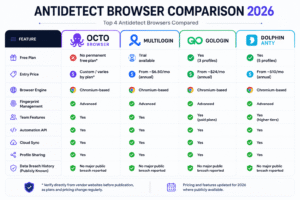
Multilogin is the leader in fingerprint quality. The best priced is GoLogin. Octo Browser strikes a workable blend between the two. Dolphin Anty is the easiest way to start – but its security history is a worry for professional use.
Antidetect Browser Alternatives
Not every use case needs a full Antidetect Browser setting. Consider the choices based on your scenario.
- Multiple physical devices. You can eliminate the fingerprint issue totally if you run each account on a separate phone or laptop. But that approach doesn’t scale – you can’t do more than three or four accounts.
- Separate browser profiles (Chrome). Chrome has built-in support for multiple profiles. Cookies and a session for every profile. But they all have the same hardware fingerprint, thus it is simple to connect them to advanced systems.
- Virtual machines. A VM creates a whole different operating environment. VMs are good for isolating accounts, especially if you use a unique proxy. But they are resource-heavy and difficult to manage at scale.
- Cloud Antidetect Browsers. Services such as Send.win provide cloud-hosted browser profiles that are accessible from any device. These don’t have to be installed on your desktop. Cloud-based solutions, however, are often newer and less battle-tested than their desktop counterparts.
But if anyone is truly managing more than 5-10 accounts, a specialized Antidetect Browser is still the most practical and scalable solution.
What Not To Do When Creating An Antidetect Browser For Multiple Accounts
Share proxies between profiles
This is the number one mistake. Using one proxy for two accounts links them directly. So treat proxies as one-to-one assignments. No exclusions.
Disregarding the warm-up period
If you’re jumping into account activity with a new account, that’s a warning sign. Platforms want some browsing history before you start creating ads or making purchases. You can use any new profile for a few days only to warm it up before you do anything major with it.
Handling Mis-matched Timezone and Language Settings
All time zones, languages, and proxy geographies of a profile must be matched. A US-based proxy with a browser in Japanese and a timezone of Europe looks like an evident discrepancy to fraud systems.
How to Log into Multiple Accounts at the Same Time From the Same Device
If you have different profiles, checking in to a lot of accounts at the same time can prompt detection. Log in at various times. Don’t make the timing unrealistic.
Finishing Things
How to Configure an Antidetect Browser for Multiple Accounts? Several basic ideas will help you understand how to configure an Antidetect Browser for multiple accounts: correct fingerprint isolation, high-quality proxies, patient warmup, and uniform profile settings.
It is not technically difficult. Most newbies skip steps – and that’s where bans occur. When used appropriately, Antidetect Browsers provide reliable account separation over the long term, even on the most detection-heavy systems.
FAQs
Q1: Is it permissible to use an Antidetect Browser?
The use of an Antidetect Browser itself is lawful in most areas. But what you do with it is important. If you make phony accounts to abuse the terms of service of the platform, you can get into legal trouble depending on your area and use. Always operate in accordance with applicable laws and platform policies.
Q2: Can you entirely prevent account bans using Antidetect Browsers?
There is no instrument that provides a guarantee. If configured properly, Antidetect Browsers dramatically lowers the danger of being banned. But bad proxy choice, skipping the warmup, or misconfigured fingerprints can still get you banned. The browser is just as good as its configuration; thus, a correct setup is vital.
Q3: How many proxies do I need for numerous accounts?
You need one unique proxy for each account. If you have 20 accounts, you’ll need 20 different proxies (ideally residential or mobile, depending on the platform). Sharing proxies between accounts directly ties them in platform logs.
Q4: Which is the best Antidetect Browser for newbies?
Dolphin Anty is the most beginner-friendly choice, mainly since it provides 10 free profiles with no time limit. However, for those scaling beyond a few users, Octo Browser or GoLogin offer better stability and team features at a fair price.
Q5: Can I use Antidetect Browsers on mobile?
The overwhelming majority of Antidetect Browsers are desktop-only. One such platform is GeeLark, which provides cloud-based Android environments to manage your mobile accounts. However, for the bulk of cases of using web platforms,s the desktop Antidetect Browser is the default solution.

