A Discord timestamp is helpful in making a huge difference—especially when you have people in your server from different countries and time zones. Instead of declaring “the event starts at 3 PM” and watching twelve people come up at the wrong hour, a Discord timestamp automatically translates to each viewer’s local time. No calculator. Not mixed up. Simply clarity.
Here’s the lowdown on how to do it well.
What does a Discord timestamp mean?
A Discord timestamp is a unique text formatting feature that shows a certain time in the world, and it will automatically update to each person reading the message according to their device’s local time zone.
So if you are in London and set a timestamp for a meeting at 8:00 PM, someone reading that message in New York will see 3:00 PM, and someone in Tokyo will see 4:00 AM the next day. The identical message is automatically localized for everyone.
It runs on Unix time, which is the number of seconds that have passed since January 1, 1970. Discord takes that number and converts it into a human-readable date and time with time zone awareness. You don’t have to know Unix math to utilize it. “You just need to know the format.
How to Create a Discord Timestamp
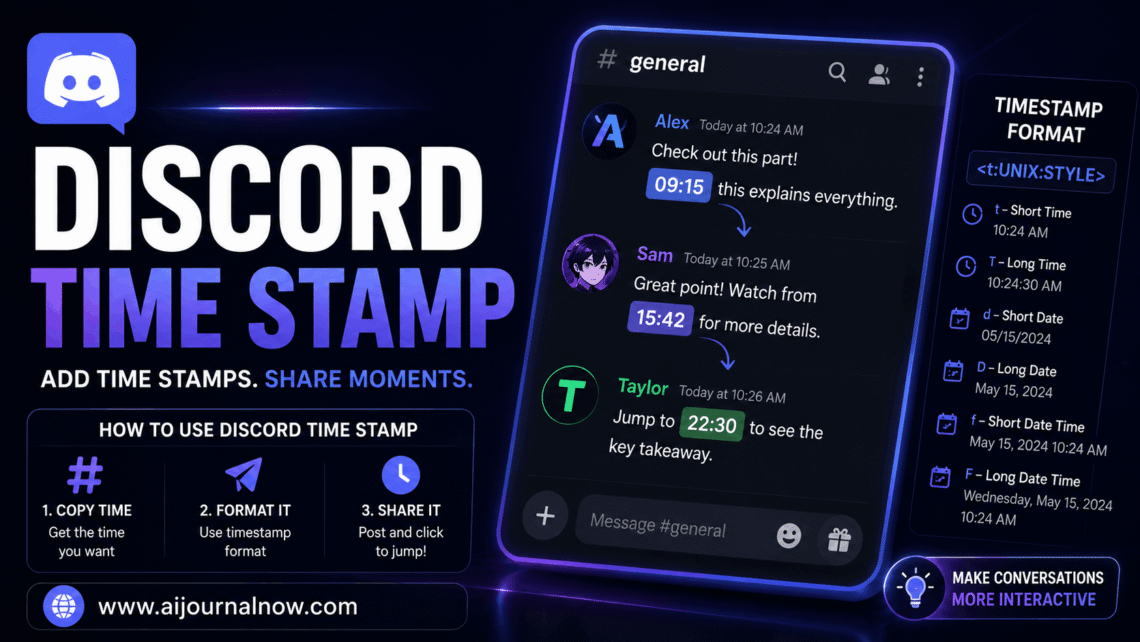
The syntax for a Discord timestamp is as follows:
`<t:UNIX_TIMESTAMP:STYLE>`
UNIX_TIMESTAMP is the number of your required date and time. You can check this quickly using free tools like HammerTime (hammertime.app) or unixtime. app; just choose your date, time, and timezone, and they’ll give you the right number in a flash.
The FORMAT portion specifies how the timestamp is displayed. Discord has a couple of styling options.
t — Time (short, e.g. 3:00 p.m.)
T Lapse of time (e.g., 3:00:00 PM)
d — Short date (e.g., 17/05/2025)
D — Full date (e.g., May 17, 2025)
f—Full date and time (e.g., May 17, 2025, 3:00 PM)
F—Full date and time (e.g., Saturday, May 17, 2025, 3:00 PM)
R – Relative time (e.g., 3 hours ago / 2 days ago)
Especially the relative format is really handy. It counts down to a future event or counts up from a past one, live, without manual updates.
The Discord Timestamp Is More Useful Than You Think
End time zone problems for global communities
Any Discord server that has an international audience will have the same problem: whose time zone are we talking about? A Discord timestamp answers the question all at once. When you create an event for a gaming session, podcast recording, or product launch, all members will automatically see it in their own local time.
The relative format builds expectations.
The R format provides for a live countdown. ‘Event starts in 4 hours’ refreshes on its own without you touching anything. This creates natural urgency and keeps your audience interested without any extra work for server events, launch announcements, or contest deadlines.
Maintains Professionalism in Server Announcements
Well-formatted Discord timestamps tell community managers, marketers, and company owners using Discord for customer or client communication that you know what you’re doing. It’s a simple touch that speaks volumes about organization and a desire for quality.
Practical Applications for Different User Types
Server admins and community managers utilize the Discord timestamp for organizing events; announcing rollouts, maintenance windows, and countdown reminders;
Students and study groups use it to arrange sessions across campuses or nations without the traditional “Wait, is that your time or mine?” back-and-forth.
If you’re a freelancer or part of a remote team, timestamps are helpful when you’re on project calls or sending deadline reminders so there’s no confusion about when anything is due.
Marketers and content providers doing live streams, debuts, or limited-time deals may insert a relative Discord timestamp into their announcement channel and let the countdown do the work.
It’s still used by gamers—Discord’s biggest user base—for raid times, tournament brackets, and server events where timing is important.
Limitations to Be Aware Of
A Discord timestamp depends on the accuracy of the user’s device clock; an improper timestamp occurs on their side. If a person has their device configured to the wrong time zone or has an improper clock, the timestamp will show up wrongly on their side. This is rare, but worth knowing.
Timestamps also only operate within Discord. If you copy & paste the raw text someplace else—a website, an email, or a Google doc—it will show up as raw Unix syntax, not a formatted time. It’s a feature that’s intrinsic to Discord.
Finally, manually producing timestamps needs knowledge of the Unix format, which trips up newcomers. That’s why third-party products like HammerTime are so popular—they make the process visual and instantaneous.
Final thoughts
One of the most useful formatting tools available on the platform is a Discord timestamp, and it’s badly underutilized. When you start using it, especially the relative countdown format, you’ll wonder how you ever organized anything without it.
If you’re running a huge community, managing a distant team, or just want your gaming group to actually show up on time, this functionality solves a real problem with no effort.
FAQ: Discord Timestamps
Q1: Do I need special authorization to utilize a Discord timestamp?
No. Timestamp formatting can be used by anyone who can send messages on Discord. This is a built-in text function, not a bot command or moderation tool.
Q2: What’s the quickest way to produce a Discord timestamp without doing the Unix math myself?
Use HammerTime at hammertime. app. Choose your date, time, and timezone; select a display format, and it instantly generates ready-to-paste Discord code.
Q3: Will the Discord timestamp change for daylight saving time?
Yes, it will. Timestamps are relative to absolute Unix time and not a certain hour, so they will adjust properly when daylight savings time starts or ends in the viewer’s area.
Q4: Can I use a Discord timestamp in bot messages and embeds?
Yes. Discord bots can deliver text in timestamp format like normal users. Many bot developers utilize timestamp embeds for event scheduling, reminder systems, and countdowns.
Q5: What if I put in the wrong Unix number by mistake?
The message will display an incorrect date or time, but you can delete it and send it again with the proper value. Just double-check your Unix number before you post something high-visibility.
Read Also: How to Underline in Discord: Quick Guide