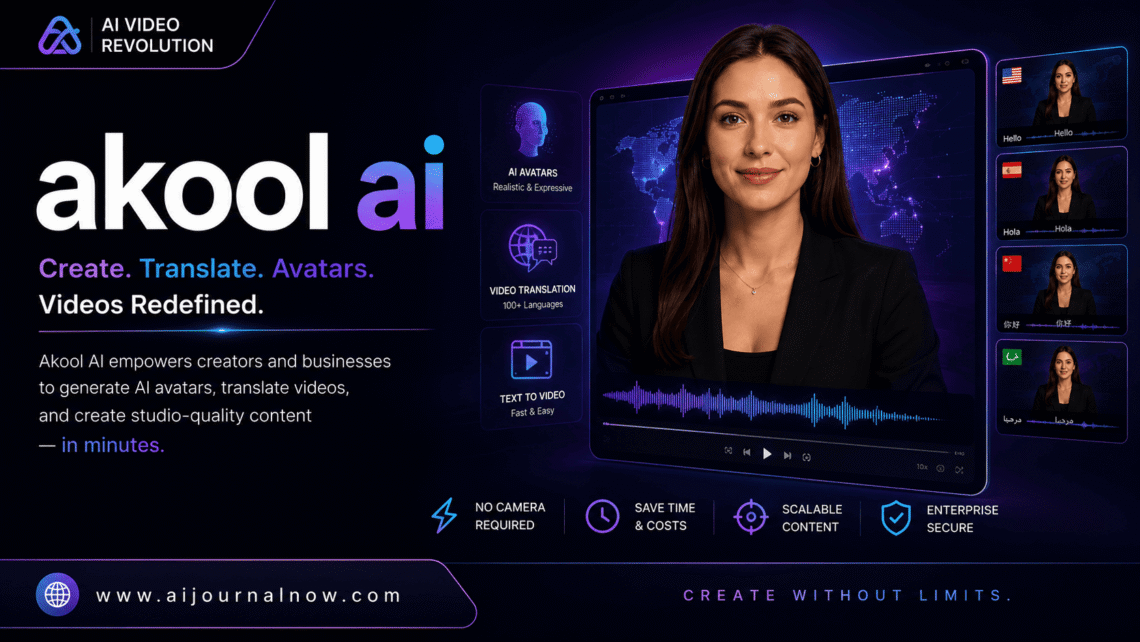
Creating hours of video material, replacing faces for commercials, or making bespoke images at scale used to need a whole production staff. Akool AI turns that equation on its head. It’s a generative AI platform created for visual content production, and it’s getting serious attention from marketers, content creators, and company owners who need high-quality output without the overhead.
This isn’t a casual photo filter app. Akool AI is a professional creative platform that can do face swapping, video translation, AI avatar development, and image customizing. Let’s unpack what it really accomplishes and whether it’s good for your work.
What is Akool AI?
Akool AI is a generative AI platform for creating visual and video content. It’s made for businesses and creators who require the ability to make personalized, high-quality visual communications at scale—without constructing an expensive in-house production pipeline.
The platform was established with a specific purpose in mind: to democratize enterprise-grade visual AI technologies. Where similar capabilities used to need proprietary machine learning infrastructure, Akool AI puts them into a clear interface that marketers and non-technical users can really manage.
Its toolset targets a number of specific use cases, from building lifelike AI avatars to use in video presentations to translating video information into different languages while maintaining the original lip movements of the speaker. That range is part of the reason it’s worth paying attention to.
How does Akool AI work?
The heart of Akool AI is AI models trained on huge amounts of visual data, fine-tuned to specific tasks such as face generation, lip sync, image-to-video generation, and real-time face swapping.
So usually the flow goes like this:
- You submit your source material—a photo, a video clip, a product image, or a backdrop scene, depending on what you’re making.
- You pick the tool and set up your preferences. Want to change a face in a video? You feed the model with a facial image of your target and let it do the swap. Do you need your spokesperson video translated into Spanish with comparable lip movements? You provide the source video and the destination language as input.
- The AI then runs the request through its underlying models and comes back with a finished output—usually in a matter of minutes depending on the complexity of the operation.
- You download or export the result for your campaigns, presentations, social media, or wherever it’s going to go.
Everything is cloud-based, so you don’t need to install anything hefty locally. Most chores are completed faster than you might think, which is important when you’re working to meet deadlines.
Key Features of Akool AI
Akool AI Face Swap
Face-switch technology is one of Akool AI’s signature features. This means you may swap out a face in a photo or video with a different one, neatly, realistically, and without the uncanny valley distortion that plagues inferior solutions.
The use cases are more professional than the name might imply. E-commerce firms use it to exhibit products with different faces on them without having to do several picture shoots. Marketing teams use it to localize advertising images for various regional audiences. “It’s a practical production shortcut, not only a novelty.
AI Avatar Creation
Akool AI can build photorealistic AI avatars from a face you specify or a visage that is entirely artificial. These avatars can be used for explainer videos, product demos, training content, and business communications.
Create an avatar once and reuse it across dozens of videos rather than hiring a spokesperson, setting up lighting, and doing a full video production. For firms who produce a lot of talking head content, this kind of efficiency adds up quickly.
Akool AI Video Translator
The video translating feature is quite great. Akool AI doesn’t merely add subtitles or dub over a different audio track on top of the original. It utilizes lip sync technology to make the speaker’s mouth movements match the translated audio, so it looks like the person is actually speaking the target language.
This removes a major production bottleneck for organizations providing training films, product tutorials, or marketing content across international markets. What professional dubbing studios and editors used to take weeks may now be done in a fraction of the time.
Personalization of Images at Scale
Akool AI also offers dynamic picture personalization—automatically generating variations of a visual with varied names, faces, backgrounds, or product data. This is especially useful for email marketing, digital advertising, and direct outreach, where individualized images always work better than generic ones.
Who Is Akool AI Designed For?
Advertising and Marketing Teams
Akool AI fits into marketing workflows like a glove. Whether you’re after specialized ad creatives for different markets, tailored images for outreach campaigns, or talking-head videos without a production budget, the platform takes care of all of it. The face swap and avatar tools alone can knock off a few line items in a normal multimedia production budget.
Content Creators & YouTubers
Akool AI can help creators who make educational or instructive material create avatar-led videos, translate their content for international audiences, or experiment with visual formats that would otherwise require collaborators or expensive technology.
Agencies and freelancers
For freelancers doing video or visual production work, Akool AI provides capabilities that once were the domain of larger teams. Agencies may add AI-powered services—video localization, bespoke visuals, and avatar generation—to their portfolio without employing more expertise.
L&D and Corporate Training Teams
Video translation and avatar solutions are especially useful for learning and development organizations developing internal training content. You can make a training video once and share it in 10 languages, with realistic lip sync, without re-recording a thing. Tools like Synthesia operate in the same space, giving you a sense of what’s possible with AI-generated training video at scale.
Akool AI’s honest limitations
No platform receives a free pass for weaknesses, and Akool AI has some worth knowing.
Quality depends on complexity. Face swaps on simple, clean, well-lit footage appear good. Weird lighting, weird angles, moving subjects, stuff like that. All of that creates artifacts that require more editing.
It costs money. Akool AI works on a credit or subscription model. There are free trials, but if you want to use it regularly and at scale, you’ll have to pay for a plan. If you’re a lone wolf or small team on a budget, pricing is worth a look before jumping in.
Ethical problems are real. Face swap and avatar technology pose significant questions surrounding permission, abuse, and ethics of synthetic media. Akool AI includes usage policies, but just like any sophisticated visual AI tool, the duty of utilizing it ethically lies with the person using it. The Partnership on AI has published useful guidance on synthetic media ethics worth reading.
Output still requires human review. The AI handles the heavy lifting, but results aren’t always ideal right out of the box. Lip sync accuracy, backdrop uniformity, and color grading sometimes necessitate a last human pass to have the content genuinely client-ready.
Akool AI Vs. Other Visual AI Tools
Tools in the visual AI domain include HeyGen, Synthesia, D-ID, and RunwayML. Where does Akool AI fit in?
The closest are HeyGen and Synthesia, which both have AI avatar and video translation capabilities. Akool AI differentiates itself by face swap quality and picture-customizing features that are not key characteristics of those platforms. RunwayML leans toward creative video generation, not business-centric personalization.
For teams looking for face swaps with video translation and personalized picture production in one place, Akool AI provides a more unified toolkit than other options.
Akool AI Welcome!
The entry point is simple. Create an account on the Akool AI platform, then choose the tool you wish to utilize and go through a step-by-step interface. The learning curve is gentle—most people achieve useful results on their first session.
There are a few recommendations that help early on: start with clean, well-lit source material for the best results; check the usage rules before starting on client projects; and test with a small batch before committing to a high-volume run.
Common Questions
Q1: Is Akool AI good for novices without any technological background?
Yes. The platform is based on an interface that is accessible for non-technical users. You don’t need to grasp AI models or coding to utilize them—the tools are set up using visual interfaces and step-by-step tutorials.
Q2: How realistic is the face swap output of Akool AI?
In good settings—clear source film, steady lighting, subjects gazing forward—the effects are fairly lifelike. Odd angles or movement can be a little less consistent in edge circumstances, but the quality is among the best choices out there for this kind of thing overall.
Q3: Can Akool AI translate videos into any language?
The platform is adding more and more languages it can use for video translation and lip sync. The exact list of languages is revised from time to time, so it’s a good idea to check their documentation before presuming a language is supported.
Q4: Does Akool AI provide a free plan?
Akool AI often provides new customers with a free trial or limited free credits. Paid subscriptions provide you full access to all services and higher use limits. Pricing levels are dependent on your consumption demands.
Q5: Is face swap ethical and legal?
It all depends on how you use it. Replacing faces (on your own content, for genuine business reasons) with consent is generally ok and covered by Akool AI’s conditions. Using it to generate false or non-consensual synthetic media is unethical and illegal in many places. Use responsibly, always.
Incorporate Akool AI in Your Workflow
Making visual content is a resource-intensive job. Akool AI doesn’t erase that complexity outright, but it does compact it—especially for the specialized jobs it’s built for.
If you consistently create video content across different markets, need individualized visuals at scale, or want to add avatar-led video to your content mix without a full production setup, Akool AI is worth a thorough look. Use it deliberately as a production tool, and it will provide real value.
Also Read: Sierra AI: What It Is and Why Businesses Are Betting Big on It