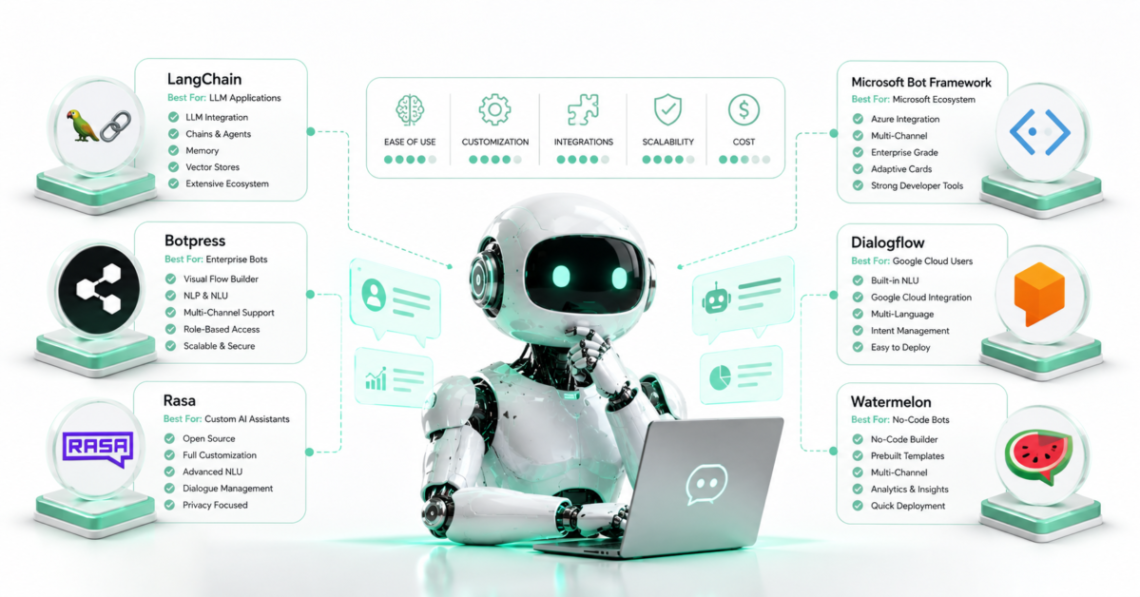
The best chatbot development framework depends on what you are actually building.
For a model-flexible AI assistant with tools and custom orchestration, LangChain with LangGraph is one of the strongest general-purpose choices. LlamaIndex is better suited to chatbots whose main job is answering questions over private or domain-specific data. Rasa stands out when conversation flows, business rules, deployment control, and enterprise governance matter. Botpress offers the easiest path in this group for teams that want a hosted visual builder rather than assembling the full stack themselves.
The newer agent SDKs address more specific ecosystems. Microsoft 365 Agents SDK makes sense for Teams, Microsoft 365 Copilot, and multichannel enterprise agents. Google Agent Development Kit (ADK) is a strong code-first option for developers building agentic applications around Google Cloud or Gemini while retaining model flexibility. OpenAI Agents SDK provides a comparatively lightweight approach to tool calling, handoffs, guardrails, sessions, and multi-agent orchestration.
There is no credible single winner across all seven because they are not identical products. Some are application frameworks, some provide orchestration runtimes, and Botpress is a managed platform as well as a development environment.
That distinction should come before any feature comparison.
The 7 Chatbot Frameworks Compared
This comparison focuses on seven actively relevant options for LLM-powered chatbot and agent development in 2026:
| Framework | Strongest Fit | Main Development Style | Framework Cost | Main Limitation |
|---|---|---|---|---|
| LangChain + LangGraph | Flexible custom AI agents and workflows | Code-first | Open source, MIT | Production architecture can require several components |
| LlamaIndex | RAG and knowledge-intensive chatbots | Code-first | Open source, MIT | Less focused on complete channel/UI delivery |
| Rasa | Controlled enterprise conversational agents | Pro-code + optional visual tools | Free Developer Edition; Enterprise custom | More opinionated platform than lightweight SDKs |
| Botpress | Fast hosted chatbot deployment | Visual + TypeScript ADK | $0 PAYG + AI spend; paid plans available | New projects are cloud-hosted, not self-hosted |
| Microsoft 365 Agents SDK | Teams, Copilot, Microsoft channels | Code-first | Open source, MIT | Most compelling inside Microsoft ecosystems |
| Google ADK | Multi-agent and Google Cloud applications | Code-first | Open source, Apache 2.0 | Broader chatbot channel layer may require extra work |
| OpenAI Agents SDK | Lightweight tool-using and multi-agent apps | Code-first | Open source, MIT | Less of an all-in-one chatbot platform |
These are framework-level costs, not the total cost of operating a chatbot. Model API calls, databases, vector storage, observability, hosting, messaging channels, speech services, and support can create separate expenses.
How We Compared the Frameworks
Rather than ranking frameworks by GitHub popularity or the number of integrations they advertise, this comparison uses criteria that affect an actual chatbot project:
- Conversation and agent orchestration
- Retrieval-Augmented Generation (RAG)
- Model flexibility
- State and memory
- Human approval controls
- Deployment flexibility
- Chat and messaging channel support
- Development complexity
- Visual development options
- Licensing and current pricing
No hands-on benchmark was supplied for this article, so claims about response quality, latency, reliability, or developer productivity are not presented as measured facts.
1. LangChain and LangGraph
Best fit: General-purpose LLM chatbots and complex agent workflows
LangChain is an open-source agent framework that provides abstractions for models, tools, middleware, structured content, and agent loops. Current LangChain agents run on LangGraph, which provides the lower-level execution layer. LangChain itself describes LangChain as the higher-level framework and LangGraph as the runtime for durable, stateful execution.
That separation makes the stack flexible.
A developer can begin with a relatively simple LangChain agent and move into LangGraph when a chatbot requires:
- Persistent state
- Long-running operations
- Human approval
- Retries
- Branching workflows
- Tool execution
- Multi-step state transitions
LangGraph supports checkpoint-based persistence, allowing an agent to pause, retain state, and resume later. That capability also powers human-in-the-loop patterns where a person can inspect or approve an action before execution continues.
Both LangChain and LangGraph use the MIT license.
Where LangChain is strongest
LangChain is a sensible starting point if you do not want the architecture tied tightly to one model vendor.
It is particularly useful for:
- Customer-facing assistants with custom APIs
- Tool-using agents
- Multi-model applications
- Research assistants
- Internal business copilots
- Stateful AI workflows
- Applications that mix deterministic steps with model decisions
Main limitation
LangChain is not a finished customer-support platform.
You may still need to choose or build the user interface, authentication layer, database, deployment environment, monitoring stack, messaging integrations, and other production services.
That flexibility is valuable for engineering teams, but unnecessary for a company that simply needs a website support bot running quickly.
Editorial recommendation: Choose LangChain when architectural flexibility matters more than having an all-in-one chatbot product.
2. LlamaIndex
Best fit: Chatbots over documents, databases, and private knowledge
LlamaIndex is especially relevant when the chatbot’s primary challenge is not conversation routing but getting the right information into the model.
Its documentation centers heavily on Retrieval-Augmented Generation. In a RAG system, information is indexed, relevant context is retrieved for a user’s query, and that context is supplied to the language model before generating the answer.
This makes LlamaIndex well suited to applications such as:
- Documentation assistants
- Internal knowledge bots
- Research assistants
- Financial-document Q&A
- Product-support knowledge systems
- Enterprise search
- Chatbots over private datasets
LlamaIndex has also developed beyond simple retrieval. Its current agent workflows support tools, structured outputs, multi-agent arrangements, and agent handoffs. Its documentation recommends modern workflows over the older Query Pipeline abstraction, which has entered a feature-freeze/deprecation phase.
LlamaIndex is available for Python and also has a TypeScript ecosystem for agents, workflows, RAG, and chatbot interfaces.
The core project uses the MIT license.
Where LlamaIndex is strongest
Choose it when questions such as these dominate your project:
Which documents should be retrieved?
How should data be indexed?
How should several data sources be queried?
How can an agent reason over private information?
Main limitation
LlamaIndex can power a chatbot, but it should not be confused with a complete customer-engagement platform.
You may still need separate infrastructure for channels, deployment, authentication, live-agent escalation, analytics, and front-end experiences.
Editorial recommendation: For a knowledge chatbot where retrieval quality and data architecture are central, start by evaluating LlamaIndex before choosing a broader agent framework.
3. Rasa
Best fit: Enterprise conversational agents with controlled business logic
Rasa has changed considerably from the intent-classification chatbot framework many developers remember.
The current Rasa Platform combines LLM-based conversational AI with CALM, Conversational AI with Language Models, and structured Flows for business logic. Rasa positions this approach around maintaining predictable business behavior while still allowing more flexible language-model conversations.
This is important for transactional assistants.
Consider a healthcare appointment bot, banking assistant, insurance workflow, telecom support agent, or enterprise service bot. The company may want natural conversation, but it may not want the LLM independently deciding what business process happens next.
Rasa’s flow-oriented approach is designed for that type of boundary.
Current Rasa documentation also includes:
- Custom actions
- Multi-LLM management
- OpenTelemetry observability
- End-to-end testing
- PII management
- REST and WebSocket connectors
- Kubernetes deployment through Helm
- No-code functionality through Rasa Studio
The current Developer Edition is free for one bot per company with up to 1,000 external conversations per month or 100 internal conversations per month. Enterprise pricing is handled through sales.
Where Rasa is strongest
Rasa is a particularly strong candidate for:
- Transactional support bots
- Enterprise assistants
- Regulated workflows
- Customer-service automation
- Bots that need explicit business flows
- Teams that want self-managed or private-cloud deployment options
Main limitation
Rasa is a broader, more opinionated platform than a lightweight agent SDK.
A developer who simply wants an LLM, three functions, and a small agent loop may find OpenAI Agents SDK or LangChain easier to start with.
Editorial recommendation: Evaluate Rasa when controlling the conversation’s business logic is as important as generating natural responses.
4. Botpress
Best fit: Hosted AI chatbots with fast visual development
Botpress occupies a different layer from most of the open-source frameworks in this comparison.
Its current product combines a hosted chatbot platform, visual Botpress Studio, integrations, Webchat, cloud APIs, customer-support tooling, and a TypeScript Agent Development Kit.
The ADK lets developers define conversations, tools, workflows, actions, knowledge, triggers, and other agent components in TypeScript. Botpress manages hosting, scaling, and channel delivery.
For teams without a dedicated AI infrastructure group, this can remove substantial setup work.
Current Botpress pricing
As of August 2026, Botpress lists:
| Plan | Monthly Price |
|---|---|
| Pay-as-you-go | $0 + AI Spend |
| Plus | $89 + AI Spend |
| Team | $495 + AI Spend |
| Managed | $1,245 + AI Spend |
| Enterprise | Custom |
Botpress says LLM usage is charged at the underlying provider cost without markup, and its PAYG tier currently includes 500 incoming messages/events per month and a $5 monthly AI credit.
One important deployment limitation should not be missed.
Botpress v12 and the previous self-hosted products have been sunset. New Botpress development uses Botpress Cloud.
That makes Botpress a poor match if self-hosting the chatbot platform itself is a hard requirement.
Where Botpress is strongest
It is attractive for:
- Website chatbots
- Customer-support agents
- WhatsApp and messaging bots
- Lead qualification
- Internal assistants
- Teams that want visual development
- Developers who want to avoid managing chatbot hosting
Editorial recommendation: Botpress has the lowest infrastructure burden among the options in this comparison, but that convenience comes with greater platform dependence.
5. Microsoft 365 Agents SDK
Best fit: Teams, Microsoft 365 Copilot, and Microsoft-centered enterprise agents
Developers researching chatbot frameworks will still encounter many lists recommending Microsoft Bot Framework.
That recommendation is outdated for new projects.
Microsoft now describes the Microsoft 365 Agents SDK as the evolution of Azure Bot Framework SDK and publishes specific migration guidance for existing Bot Framework applications.
The newer SDK supports:
- .NET
- JavaScript
- Python
- Microsoft 365 Copilot
- Microsoft Teams
- Webchat and other channels
- State management
- Authentication
- Multiple AI orchestration approaches
Microsoft deliberately keeps the SDK relatively unopinionated about the AI layer. Its documentation says developers can combine it with technologies such as Semantic Kernel, OpenAI Agents, LangChain, Azure services, or a custom orchestrator.
The project is MIT licensed.
Where Microsoft 365 Agents SDK is strongest
Choose it when the chatbot needs to live inside:
- Microsoft Teams
- Microsoft 365 Copilot
- Microsoft enterprise identity environments
- Azure-connected applications
- Multichannel Microsoft deployments
It is especially relevant when Microsoft Entra ID authentication, Microsoft Graph access, or existing Microsoft infrastructure already forms part of the application architecture.
Main limitation
The SDK is less compelling if Microsoft channels are irrelevant to the project.
It can work with different models and orchestration frameworks, but its unique value comes primarily from the Microsoft agent and channel ecosystem.
Editorial recommendation: Do not begin a new Microsoft chatbot architecture on legacy Bot Framework guidance without checking the current Agents SDK path first.
6. Google Agent Development Kit
Best fit: Code-first multi-agent applications and Google Cloud deployments
Google’s Agent Development Kit, or ADK, is an open-source framework for developing and orchestrating AI agents.
Google describes ADK as optimized for Gemini and its ecosystem while remaining model-agnostic and deployment-agnostic.
That distinction makes ADK more interesting than a Gemini-only SDK.
Current documentation supports development across:
- Python
- TypeScript
- Go
- Java
- Kotlin
ADK also provides agent orchestration patterns, tools, sessions, deployment capabilities, evaluation, and integrations with protocols such as MCP.
The project uses the Apache 2.0 license.
Where Google ADK is strongest
It deserves consideration for:
- Multi-agent systems
- Gemini applications
- Google Cloud deployments
- Tool-using assistants
- Developers who want explicit agent orchestration
- Teams building toward agent-to-agent architectures
Main limitation
ADK is primarily an agent-development framework rather than a complete hosted customer-chat platform.
Developers may still need a user interface, channel delivery layer, authentication system, production infrastructure, and other services depending on deployment.
Editorial recommendation: Google ADK is a strong candidate for teams building serious agent applications rather than just adding a basic FAQ chatbot to a website.
7. OpenAI Agents SDK
Best fit: Lightweight tool-using, multi-agent, and voice applications
OpenAI Agents SDK deliberately uses a smaller set of abstractions than frameworks that attempt to cover every layer of an AI application.
Its current Python and TypeScript implementations center around concepts such as:
- Agents
- Tools
- Agent loops
- Handoffs
- Guardrails
- Sessions
- Structured outputs
- Tracing
- Human-in-the-loop
- Multi-agent orchestration
The TypeScript SDK also includes Realtime Agents and sandbox-oriented agent capabilities.
The Python project describes itself as provider-agnostic, with support extending beyond OpenAI models through additional integrations.
Both the Python and JavaScript SDKs use the MIT license.
Where OpenAI Agents SDK is strongest
It fits developers who want:
- A relatively small API surface
- Function/tool calling
- Multi-agent handoffs
- Guardrails
- Structured output
- Realtime or voice-agent development
- Built-in tracing
- Direct integration with OpenAI’s agent ecosystem
Main limitation
Like LangChain and Google ADK, it is a development framework rather than a complete support-chat product.
An application still needs the surrounding production stack.
Editorial recommendation: Choose OpenAI Agents SDK when you want an agent framework with fewer abstractions and your architecture fits its agent, tool, handoff, and guardrail model.
Which Framework Is Best for Each Use Case?
A single ranking hides the decisions that actually matter.
| Use Case | Strong Candidate | Why |
|---|---|---|
| General custom LLM chatbot | LangChain | Broad model/tool abstractions |
| Complex stateful agent | LangGraph | Durable execution and explicit state |
| Chatbot over documents | LlamaIndex | Strong RAG and data architecture |
| Enterprise transactional assistant | Rasa | Controlled flows and enterprise deployment |
| Fast visual website chatbot | Botpress | Hosted Studio, webchat, integrations |
| Teams or Microsoft 365 bot | Microsoft 365 Agents SDK | Microsoft channels and identity ecosystem |
| Google Cloud agent | Google ADK | Google ecosystem plus model-flexible design |
| Lightweight agent application | OpenAI Agents SDK | Small set of agent primitives |
| Human approval in complex workflows | LangGraph | Persistence and interrupt/resume architecture |
| Visual builder with human support handoff | Botpress | Hosted conversation and support tooling |
These recommendations reflect architectural fit, not measured model-output quality.
The LLM you connect to the framework can affect answer quality far more than the orchestration library itself.
Framework vs Model: Do Not Confuse the Two
A chatbot framework and an AI model solve different problems.
The model produces or interprets language.
The framework may manage:
- Conversation state
- Tools
- Retrieval
- Routing
- Memory
- Business rules
- Human approval
- Authentication
- Deployment
- Channel delivery
Switching from LangChain to LlamaIndex does not automatically make the underlying model smarter.
Likewise, changing from one model to another does not automatically solve weak retrieval, poor tool permissions, missing conversation state, or an unreliable workflow.
This becomes especially important as developers connect agents to external tools through MCP. AI Journal Now’s guide to Zapier MCP use cases shows how conversational agents can retrieve data and execute actions across business applications while still requiring access controls and approval boundaries.
Open Source Does Not Mean the Chatbot Is Free
Most of the code-first options here can be used without paying a framework license.
That does not make production deployment free.
A realistic chatbot budget may include:
Model usage + hosting + vector database + storage + monitoring + messaging channels + speech + engineering + support
For example, running LangChain itself does not generate a LangChain framework charge, but a chatbot using a commercial model API still incurs model costs.
Botpress takes a different approach. Its hosted platform has explicit workspace pricing plus AI Spend.
Rasa sits between those models, offering a free Developer Edition with usage limits and commercial enterprise plans.
Evaluate the full architecture rather than comparing only framework subscription prices.
How to Choose Without Rebuilding Six Months Later
A useful framework-selection process starts with architecture rather than brand popularity.
If the chatbot mainly answers questions from your data
Start with LlamaIndex.
Then determine whether you need another orchestration or channel layer around it.
If the chatbot performs complex multi-step actions
Evaluate LangChain/LangGraph, Google ADK, or OpenAI Agents SDK.
LangGraph deserves extra attention when state persistence, retries, deterministic sections, and human approvals are central requirements.
If conversation must follow strict business processes
Evaluate Rasa.
It provides a clearer framework for separating flexible language understanding from controlled business flows.
If you need to launch without building infrastructure
Evaluate Botpress.
Its cloud model removes much of the hosting and channel work, although it also creates greater platform dependence.
If users already work inside Teams or Microsoft 365
Start with Microsoft 365 Agents SDK.
Its strongest advantage is not raw AI capability. It is its position inside Microsoft’s agent, identity, and channel ecosystem.
A Practical Architecture Example
Imagine a company building an AI customer-support agent.
The system needs to:
- Answer policy questions from company documents.
- Look up customer accounts.
- Create support tickets.
- Escalate refunds for approval.
- Maintain conversation history.
- Run on web chat.
There is no rule saying one framework has to perform every layer.
A custom architecture could use LlamaIndex for retrieval, LangGraph for the stateful workflow, an external model API for reasoning, and a separate web interface.
Another company may decide that maintaining four separate components is unnecessary and implement the whole customer-facing experience inside Botpress.
A Microsoft-heavy enterprise may use Microsoft 365 Agents SDK for the channel and identity layer while using LangChain or another orchestrator for AI logic. Microsoft explicitly supports this type of modular approach.
The correct architecture depends on how much infrastructure your team wants to own.
AI Journal Now’s guide to AI automation for small business makes a related point for business workflows: use AI where interpretation is useful, but keep deterministic steps and human approval where the cost of an error is high.
Common Chatbot Framework Selection Mistakes
Choosing from an outdated comparison
A list recommending Microsoft Bot Framework as Microsoft’s default new chatbot stack is now stale. Current Microsoft documentation points existing Bot Framework users toward Microsoft 365 Agents SDK migration.
Assuming every “framework” is equivalent
Botpress Cloud and LangGraph do not solve the same layer of the problem.
Comparing them only by feature count creates a poor architectural decision.
Choosing for integration count alone
A project may technically support hundreds of integrations and still be difficult to secure, test, debug, or maintain.
Start with the integrations the chatbot actually needs.
Ignoring human approval
If the chatbot can send email, issue refunds, modify records, publish information, or trigger external actions, the framework’s ability to pause, validate, or request approval matters.
Building an agent when a simple workflow is enough
Not every chatbot needs autonomous planning.
A deterministic flow with one retrieval step may be more reliable than a multi-agent architecture.
Final Recommendation
There is no universal winner in this chatbot development frameworks comparison.
For most developers building a custom, model-flexible AI application, LangChain with LangGraph offers the broadest general-purpose starting point.
For RAG and private-data chatbots, choose LlamaIndex.
For enterprise conversational systems with controlled business flows, shortlist Rasa.
For visual development and managed hosting, evaluate Botpress.
For organizations deeply invested in Microsoft 365 and Teams, use the current Microsoft 365 Agents SDK rather than beginning a new project with legacy Bot Framework guidance.
For Google-centered agent development, Google ADK provides a modern, open-source, multi-language option.
And for developers who want a lighter agent abstraction with tools, handoffs, guardrails, tracing, and realtime capabilities, OpenAI Agents SDK deserves consideration.
The framework should follow the architecture.
Define where the chatbot gets knowledge, what actions it can perform, which steps require deterministic logic, where humans must approve decisions, which channels it needs to support, and which infrastructure your team is prepared to maintain.
Then choose the framework that removes the most unnecessary engineering without taking away the control your application actually needs.


