Filmora is a solid video editor. It’s beginner-friendly, looks good, and gets the job done for most casual editing needs. But it’s not perfect for everyone. Maybe the watermark on the free version is driving you up the wall. Maybe you’ve outgrown it and need something more powerful. Or maybe the subscription pricing just doesn’t make sense for how often you actually edit.
Whatever the reason, there are genuinely good Filmora alternatives out there — some free, some paid, some more powerful, and some even easier to use. This guide covers the best ones honestly, so you can pick the right fit without wasting time downloading tools that won’t work for you.
Why People Look for a Filmora Alternatives
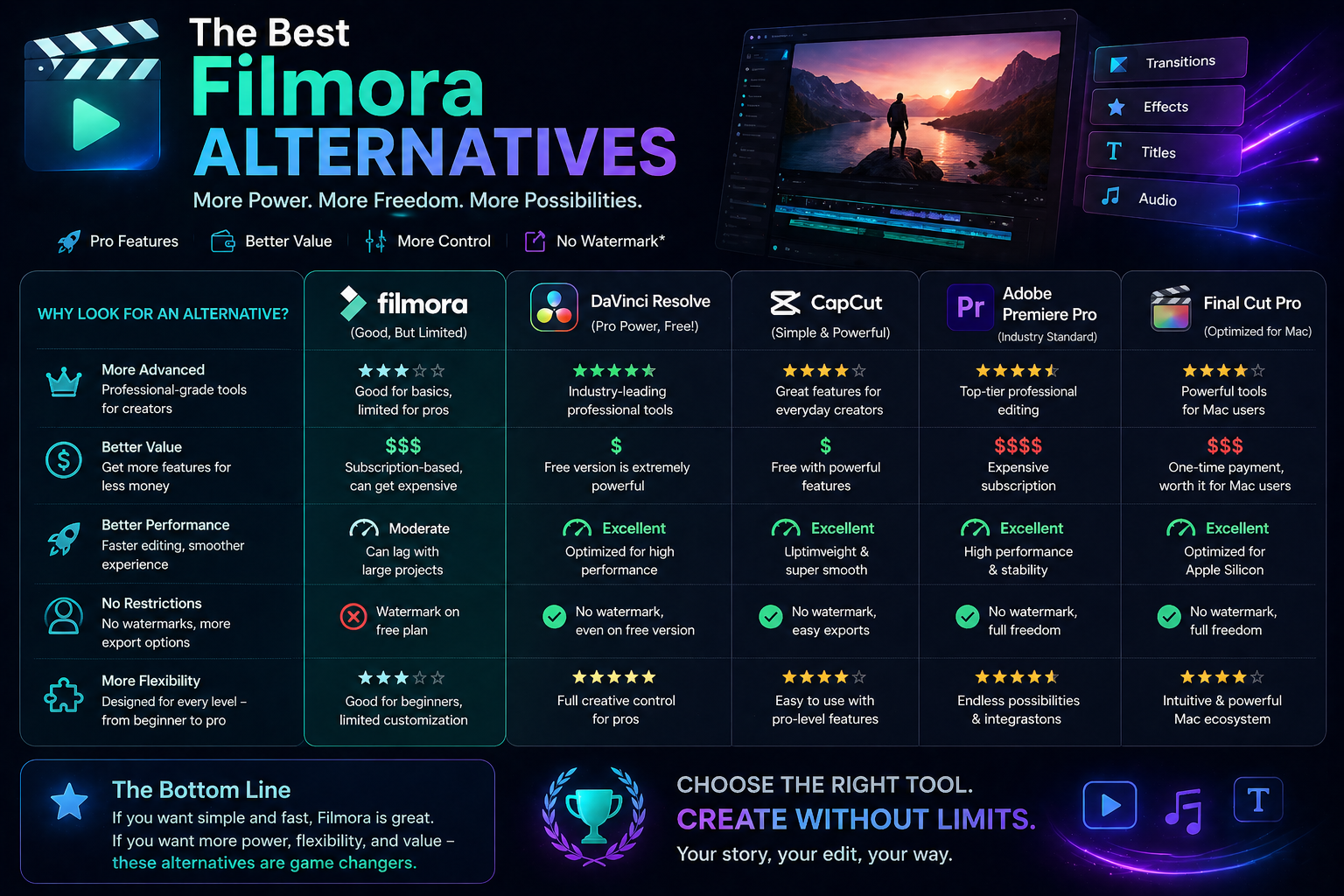
Filmora’s biggest friction points come up regularly in user feedback. The free version adds a visible watermark to every export, which makes it unusable for anything professional or client-facing. The paid plans are reasonably priced on their own, but the annual subscription model means you’re paying whether you edit once a week or once every few months.
On the feature side, Filmora is designed for beginners — which is a strength for new editors but a limitation for anyone wanting advanced color grading, precise audio mixing, or a faster timeline workflow. Once you start bumping into those ceilings, it makes sense to look elsewhere.
Best Free Filmora Alternatives
DaVinci Resolve
If you only download one tool from this list, make it DaVinci Resolve. The free version is not a stripped-down trial — it’s a professional-grade editor that Hollywood colorists and TV editors use daily. You get a full timeline, advanced color grading tools, Fairlight audio mixing, and Fusion for visual effects, all at zero cost.
The learning curve is steeper than Filmora. There’s no denying that. But there are hundreds of free tutorials on YouTube, and most beginner users get comfortable with the core editing workflow within a week or two. For anyone serious about improving their editing skills, DaVinci Resolve is the obvious long-term choice.
CapCut
CapCut has become one of the most popular free video editors among content creators, and for good reason. It’s available on Windows, Mac, iOS, and Android, making it genuinely cross-platform. The interface is clean and intuitive — arguably easier than Filmora — and it exports without a watermark on the free plan.
It’s particularly strong for short-form content: Reels, TikToks, YouTube Shorts. Auto-captions, trending templates, beat sync, and one-tap effects are all built in. For long-form documentary or cinematic editing it’s limited, but for social media content it’s hard to beat for free.
Kdenlive
Kdenlive is an open-source editor that runs on Windows, Mac, and Linux. It’s more capable than most people expect from a free tool — multi-track timeline, keyframe animation, proxy editing for smooth playback on slower computers, and a solid set of built-in effects. It’s actively developed and doesn’t add watermarks or usage limits.
It’s not as polished as Filmora visually, and the interface takes some getting used to. But for anyone who wants a genuinely free editor without compromise, Kdenlive is underrated.
If you’re coming from Filmora and want the least disorienting switch, try CapCut first. The layout and workflow logic are similar enough that you’ll feel at home quickly — without the watermark frustration.
Best Paid Filmora Alternatives
Adobe Premiere Pro
Premiere Pro is the industry standard for professional video editing. If you’re working in film, television, marketing, or corporate video production, this is almost certainly what your clients and collaborators are using. It integrates seamlessly with After Effects, Audition, and the rest of Adobe’s Creative Cloud suite.
It’s expensive — around $55 per month as a standalone app, or bundled with Creative Cloud for more. And it’s overkill for casual creators. But if you’re editing professionally or aspire to, learning Premiere Pro is an investment that pays off.
Final Cut Pro
Final Cut Pro is the best option for Mac users who want professional features without Premiere Pro’s subscription model. It’s a one-time purchase of $299.99 — which sounds steep until you realize there are no ongoing fees, ever. For regular editors, it pays for itself within a couple of years compared to a Premiere subscription.
The magnetic timeline takes adjustment if you’re used to traditional track-based editing, but most users find it faster once they adapt. Performance on Apple Silicon Macs is exceptional — it handles 4K and even 8K footage with noticeably less lag than most competitors.
iMovie (Free for Mac users)
If you’re on a Mac and Filmora felt like too much, iMovie might actually be a better fit. It’s completely free, comes pre-installed on every Mac, and exports without watermarks. The feature set is intentionally limited — no multi-cam, no advanced color tools, no keyframe control — but for simple edits, vlogs, and family videos it’s perfectly functional. It also exports directly to Final Cut Pro if you ever want to upgrade.
Which Filmora Alternatives Should You Choose?
The honest answer depends on what you’re actually editing and how often. For social media content creators who want free and fast, CapCut is the easiest switch. For anyone serious about learning video editing properly, DaVinci Resolve is the obvious choice — it’s free, professional, and future-proof. For Mac users who edit regularly and want something in between, Final Cut Pro’s one-time price is worth it over the long run. And if you’re going professional, Premiere Pro is hard to avoid despite the cost.
Don’t install multiple editors at once hoping to compare them side by side. Pick one based on your use case, commit to it for two weeks, and actually learn it. Switching between tools before you’re comfortable with any of them just resets your learning every time.
Frequently Asked Questions
What is the best free alternative to Filmora without a watermark?
CapCut is the most beginner-friendly free Filmora alternative that exports without a watermark. DaVinci Resolve is the most powerful free option and also watermark-free. Kdenlive is a strong open-source choice for users on Linux or those who prefer software they fully own. All three are genuinely free for regular use — not just limited trials.
Is DaVinci Resolve really free or does it have hidden costs?
The free version of DaVinci Resolve is genuinely free with no time limit, no watermark, and no hidden charges. Blackmagic Design sells a paid Studio version for a one-time fee of $295 that unlocks collaboration features, some advanced noise reduction tools, and certain effects. For the vast majority of solo creators and editors, the free version has everything they need and more.
Can I import my Filmora project files into another editor?
Unfortunately, no. Filmora uses a proprietary project format that isn’t compatible with other video editors. If you’re switching tools, you’ll need to start new projects from scratch in the new software. Your original media files — video clips, photos, audio — are all still accessible and can be imported into any editor. Only the timeline edits and effects you built in Filmora won’t carry over.
Is Filmora worth paying for, or should I just switch?
Filmora makes sense if you edit occasionally, value a simple interface, and want something that works well out of the box without a learning curve. If you edit regularly and want to grow your skills, DaVinci Resolve or Final Cut Pro will serve you better long-term. If budget is the main concern, CapCut or DaVinci Resolve eliminate the cost entirely without meaningful sacrifices for most use cases.
Filmora filled a gap when it launched — and it still does for a specific type of user. But the alternatives have caught up in a big way. Whether you want free and simple or professional and powerful, there’s a better fit for most people somewhere on this list. The best editor is always the one you’ll actually use consistently.