Winston AI has become one of the most talked-about tools in the content and education space, and for good reason—the question of whether a piece of writing was created by a human or generated by an AI has gone from theoretical to genuinely urgent. Teachers are questioning student submissions. Editors are second-guessing freelancers. SEO managers are auditing their content teams. And Winston AI sits right at the center of all of it, promising to tell you the truth about where your content came from.
But does it actually deliver? Let’s get into it.
What Is Winston AI and What Does It Do?
At its core, Winston AI is an AI content detection tool. You paste in a piece of text—or upload a document—and it tells you the probability that the content was written by a human versus generated by an AI tool like ChatGPT, Claude, Gemini, or similar models.
It was built specifically for the growing need to verify content authenticity. Unlike general-purpose grammar checkers or plagiarism tools, Winston AI focuses entirely on one question: did a person write this, or did a machine?
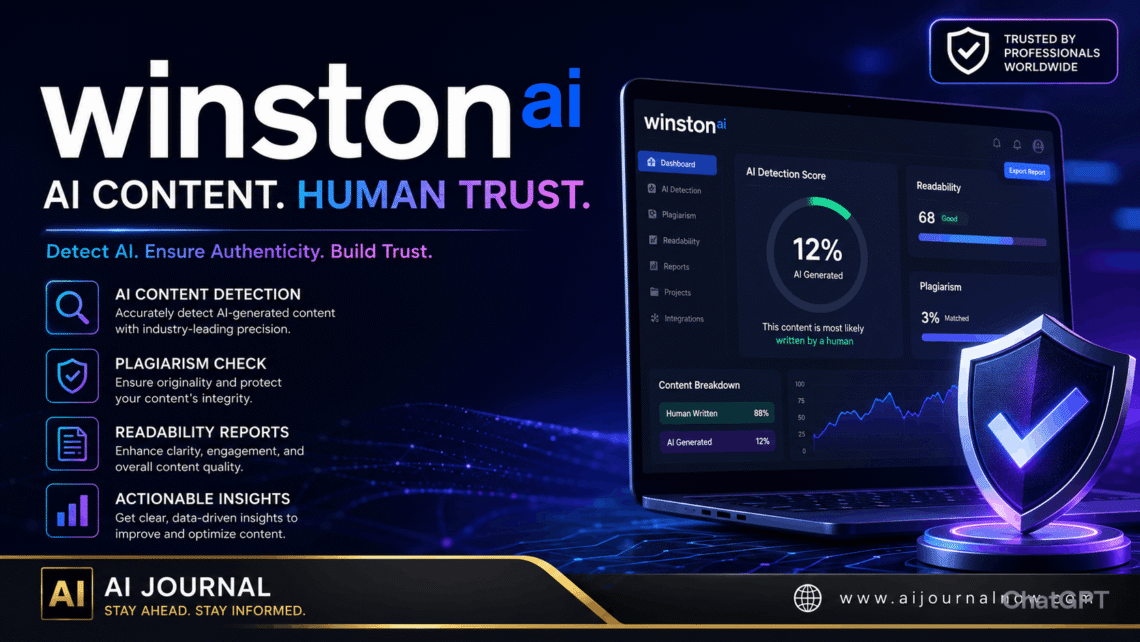
The platform uses a combination of machine learning models trained on large datasets of both human-written and AI-generated content. It analyzes writing patterns, sentence predictability, structural consistency, and other linguistic signals that tend to differ between human and AI output. The result is a percentage score — usually displayed clearly on a clean dashboard — along with a highlighted breakdown of which parts of the text triggered the detection.
That visual breakdown is one of the features users appreciate most. Instead of just getting a number, you can see sentence by sentence where the tool flagged potential AI content. That’s actually useful, especially for editors or teachers who need to show their reasoning.
Winston AI: Who Is It Actually For?
The short answer: a lot of people.
Teachers and professors are probably the most obvious use case. Academic integrity has become genuinely complicated since AI writing tools became widely available. Winston AI gives educators a tool to check submitted work and identify whether a student likely used AI to complete an assignment—though, importantly, no detection tool should be used as the sole basis for an accusation.
Content managers and editors working with freelancers or agencies use Winston AI to verify that submitted articles are genuinely human-written. If you’re paying for original content, you have a reasonable interest in knowing it wasn’t outsourced to ChatGPT.
Publishers and blog owners who care about Google’s helpful content standards also have reason to care. While Google hasn’t explicitly banned AI content, it has made clear that low-quality, unhelpful content — regardless of how it was produced — can hurt rankings. Verifying that published content meets a human quality standard is part of responsible publishing.
Freelancers can also use it to verify their own work, particularly if they use AI tools to assist and then heavily edit the output. Checking before submission can prevent awkward conversations with clients.
How It Works: A Closer Look
Using Winston AI is straightforward. The interface is clean and doesn’t require any technical setup. You either paste text directly into the editor or upload a file — it supports Word documents and PDFs, which is a practical touch for anyone dealing with formatted submissions.
Once submitted, the tool processes the content and returns a score. The score typically ranges from 0% to 100% human-generated. A score of 94% human, for instance, means the tool is fairly confident a person wrote it. A score of 35% human means the tool strongly suspects AI involvement.
The highlighted text view breaks the document into segments and color-codes them based on the likelihood of AI generation. Sentences flagged in red or orange are the ones the model found most suspicious. This is helpful not just for detection but for understanding—you can start to recognize patterns in what AI-generated writing actually looks like.
Winston AI also includes a plagiarism checker, which runs alongside the AI detection. That combination makes it genuinely more useful than standalone detection tools, since content can be both AI-generated and pulled from existing sources.
One feature worth noting is the OCR (Optical Character Recognition) capability. This allows users to upload scanned documents or images of text and still run detection. For teachers dealing with handwritten-to-digital submissions, or anyone working with non-digital source documents, that’s a meaningful addition.
Winston AI: Accuracy and Limitations
Here’s where an honest review has to pump the brakes a little.
Winston AI performs well on clearly AI-generated content — text that was produced with minimal editing directly from a chatbot. In those cases, accuracy rates tend to be high. The tool is generally reliable when someone has just copy-pasted a ChatGPT response without modification.
The challenges emerge in the gray zones. Heavily edited AI content, content written in a very formal or technical style, non-native English writing, and highly structured professional documents can all trigger false positives. A human-written legal brief might score lower on the human scale simply because legal writing tends to be predictable, structured, and formulaic — characteristics that overlap with AI output.
The reverse can also happen. If someone prompts an AI to write in a casual, varied, conversational style and then runs it through Winston AI, the score may come back higher on the human side than expected.
This isn’t a flaw unique to Winston AI — it’s a limitation of the entire category of AI detection tools. No tool can claim 100% accuracy, and most reputable ones say so explicitly. The score should be treated as one data point among many, not a final verdict.
Winston AI Pricing: Is It Worth It?
Winston AI offers a free plan with limited monthly scans, which is enough to test the tool and get a feel for how it performs on your specific content type.
Paid plans are priced based on word count limits per month, making them practical for both light users—teachers checking occasional assignments—and heavy users like content agencies running dozens of articles through detection each week.
Compared to competing tools, Winston AI sits in a mid-range price bracket. It’s not the cheapest option, but the combination of AI detection, plagiarism checking, OCR, and a clean visual interface justifies the cost for users who need the full package.
For freelancers or individuals who only need occasional checks, the free tier or a one-month subscription around exam or deadline season may be enough.
Winston AI vs. Other Detection Tools
Several tools compete in this space—GPTZero, Originality. AI, Copyleaks, and others. So why do people specifically reach for Winston AI?
A few reasons come up consistently. The interface is cleaner and more intuitive than most competitors. The sentence-level highlighting is a genuinely useful output format. And the OCR support sets it apart for users working with physical documents.
That said, originality. AI is often considered stronger for SEO professionals and content agencies, with more granular reporting. GPTZero has strong adoption in academic settings and offers integrations with learning management systems.
The honest answer is that no single tool is best for everyone. Winston AI tends to win on usability and the breadth of its feature set for the price.
Real-World Uses
A high school teacher in Texas runs every submitted essay through Winston AI before grading. She doesn’t use it to automatically penalize students — she uses it to flag work that warrants a closer conversation.
A content agency in London uses it as part of their quality control workflow. Every article submitted by a freelancer goes through detection before being approved for client delivery.
A blogger who uses AI tools to draft outlines and research summaries runs his own posts through Winston AI before publishing—just to make sure his heavy editing has moved the needle enough that the final product reads as genuinely his.
These are normal, practical uses that reflect what the tool is actually good at.
Wrapping Up
Winston AI isn’t a perfect solution — nothing in this space is — but it’s one of the more reliable and user-friendly options available for anyone who needs to verify content authenticity. Whether you’re an educator, a content manager, or a freelancer trying to stay transparent with clients, Winston AI gives you a clear, actionable read on the content you’re working with.
Use the score as a guide, not a gavel. Pair it with your own editorial judgment. And if you haven’t tried it yet, the free plan is a low-risk way to see how it performs on your specific content type.
FAQ
Q1: Is Winston AI accurate enough to use in academic settings? It performs well on clearly AI-generated content, but no detection tool is infallible. False positives can occur with formal or structured human writing. Most educators use it as a flag for follow-up conversation rather than definitive proof of misconduct.
Q2: Can Winston AI detect content from all AI tools? It’s trained to detect output from major models, including ChatGPT, Claude, Gemini, and others. However, heavily edited or paraphrased AI content may score differently. Detection accuracy improves with less-edited outputs.
Q3: Does Winston AI check for plagiarism too? Yes. Winston AI includes a built-in plagiarism checker that runs alongside the AI detection scan. This makes it more comprehensive than tools that only handle one of those functions.
Q4: Is the free plan actually useful or just a teaser? The free plan includes a limited number of scans per month, which is genuinely useful for light or occasional use. For anyone running regular checks on multiple documents, a paid plan makes more sense. But the free tier is enough to properly evaluate the tool before committing.
Q5: Can Winston AI scan handwritten or scanned documents? Yes, the OCR feature allows users to upload images or scanned documents and run AI detection on the extracted text. This is a practical feature for educators and anyone working with physical documents.
Also Read: Edge AI News: What’s Happening Right Now and Why It Matters